I used to max out at 5 designs a week because mapping the mockups in Shopify took forever! Now with Maestro I just select all my products, click "Sync," and I'm done.
Stop Manually Uploading Mockups to Shopify Variants.
Scale your store to hundreds of products without the burnout. Mockup Maestro completely automates your Printify-to-Shopify workflow so you can stop doing manual data entry.
No credit card required. Full platform access.
Spring launch batch
100 products syncing to Shopify
One saved template applies mockups, maps color variants, and pushes listings live automatically.
100 Shopify listings published with variants matched.
"Passive Income" Shouldn't Mean
20 Hours of Data Entry.
When I first started my Print on Demand store, I thought I was building passive income. Instead, I found myself stuck in a minimum-wage data entry job.
If you're doing things the "old way," you already know the grind:
- Upload designs one by one and click the exact same boxes in Printify for every single product.
- Publish to Shopify one by one, slowly waiting for each listing to generate.
- Settle for ugly default mockups, or generate them elsewhere, download them, and manually upload them to Shopify.
- Manually open every listing to link each image to the correct color variant dropdown.
Hundreds or thousands of clicks just to launch a batch of shirts. It's the fastest way to burn out.
There's a Better Way
Launch 100 Products
Before Your Coffee Gets Cold.
Mockup Maestro isn't some bloated corporate software trying to run your entire business. It's just a hyper-focused automation tool designed to kill the most annoying parts of your workflow. Here is how you go from a folder of raw designs to live products in minutes:
Drop & Detect
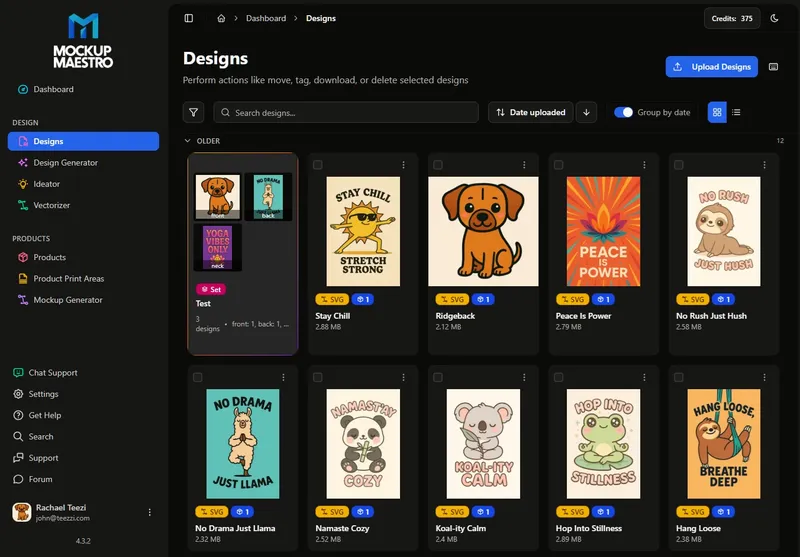
Drag up to 50 design files into the Smart Design Manager. The system automatically detects the top 5 colors in your artwork and separates lights from darks instantly — so you never accidentally push dark designs onto dark shirts ever again.
Learn about the Smart Design Manager →The Master Template
Stop clicking the same settings over and over. Choose your favorite blank (like the Gildan 64000), set your prices, and save it as a template. Apply it to all your designs to create your products with one click.
Explore the Bulk Product Creator →Push, Mockup & Sync The Magic Trick
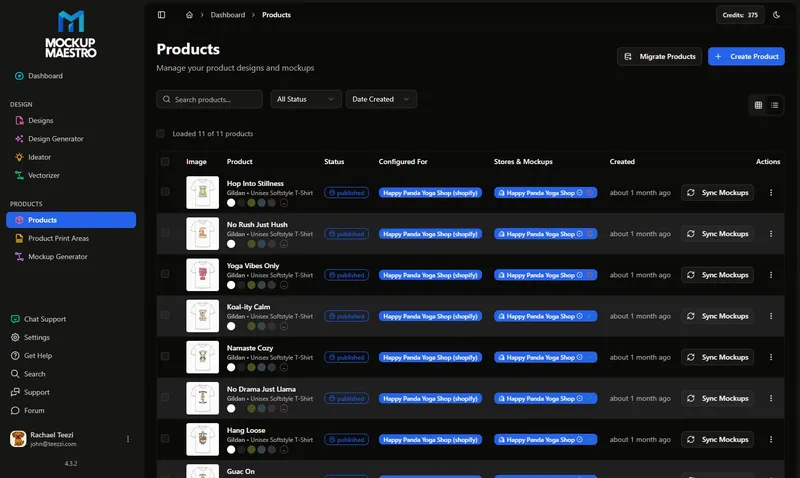
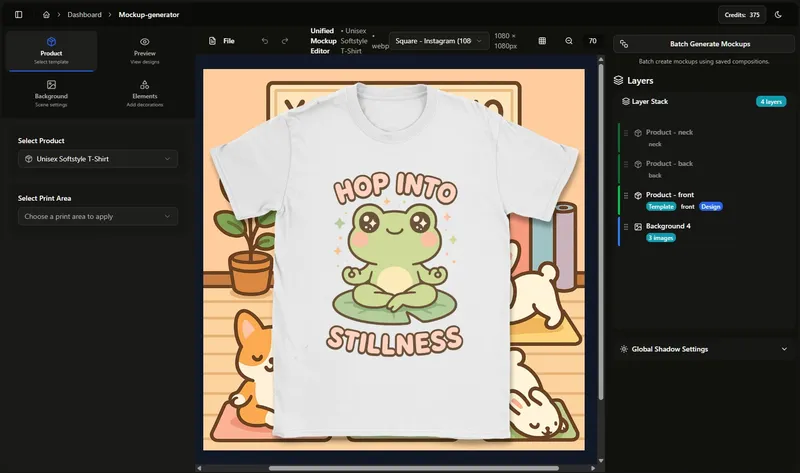
1-Click push your entire batch to Printify. Then, generate your high-res mockups in bulk and sync them to Shopify. Our system automatically assigns the correct mockup images to specific color variants. Say goodbye to the soul-crushing manual mapping phase.
See how Color Variant Mapping works →Ready to stop doing this
by hand?
Set up the workflow once, then let Mockup Maestro handle the grind. Push 100 products to Shopify in minutes without the manual chaos.
No corporate BS. Just a guy, a dog, and a tool that actually does the work for you.
"If you've ever spent 4 hours straight copying, pasting, resizing, and clicking 'upload' on POD designs, you already know why I built Mockup Maestro.
I'm John. After I lost my film animation job, Print on Demand was supposed to be my lifeline. Instead, the manual repetition was sucking the life out of me. I realized if I was ever going to scale my store, I either needed to go bankrupt hiring an assistant, or build software to automate the grind.
Today, this tool is basically the central nervous system for my own Shopify stores.
That's the best guarantee I can give you: I need it to work just as badly as you do. When issues pop up, I don't have to wait for a dev team in another country to look at it next quarter. I sit down and fix it.
I'm running this to help folks like us save time, so there's no corporate board forcing me to sell you predatory "credit packs" to pad the bottom line. It's just me and my very helpful dog, Tina.
If you ever need help, I'm the one answering the emails.
Let's get your store scaled so you can get back to creating (or actually getting some sleep).
Trying to add new products to my store was literally a nightmare. I was avoiding it, and my sales were suffering. Now with Mockup Maestro I don't get anxiety when thinking about my store, and launching new products is as simple as 3 clicks.
The light and dark design matching has been great. Almost all my designs have black or white versions. Trying to manually set each one up on Printify just isn't an option. I don't think there's any other way to do this other than Mockup Maestro.
Need a Deeper Breakdown?
Use the path that matches your decision stage: product tour, competitor comparison, or pricing.
View the full feature map
See the complete platform architecture and jump directly to each module.
Go to Features HubCompare against alternatives
Review workflow differences between Mockup Maestro and other common POD stacks.
Go to ComparisonValidate plan fit
Confirm pricing before rollout and match cost to your weekly listing volume.
Go to PricingExplore by Workflow
Choose the hub that matches your next execution step.
Solution paths
Start with persona-based workflows for POD, digital, and Etsy-focused sellers.
Open SolutionsIntegration workflows
Connect your setup to Shopify, Printify, Etsy, TikTok Shop, and WooCommerce.
Open IntegrationsFree quality tools
Run fast checks like DPI validation before sending assets into your listing pipeline.
Open ToolsLearning tracks
Follow practical rollout tracks for automation, publishing, and scaling routines.
Open POD AcademyPOD glossary
Clarify technical terms and process concepts before you commit to batch changes.
Open GlossaryComparison hub
See workflow-first comparisons to choose the right stack for your operating model.
Open Compare HubPopular Comparisons
Review the tradeoffs before committing to a workflow stack.
Maestro vs MyDesigns
Compare learning curve, bulk speed, and day-to-day publishing complexity.
Open MyDesigns ComparisonMaestro vs Canva
Understand the difference between manual design tools and automation workflows.
Open Canva ComparisonMaestro vs Placeit
Compare one-off mockup creation against batch-first catalog generation.
Open Placeit ComparisonReference Pages
Use these quick references for planning and troubleshooting.
POD profit calculator
Estimate margins and unit economics before rolling out new templates.
Open Calculator GuidePrintify vs Printful
Compare fulfillment options when designing your production layer.
Open Fulfillment ComparisonWhat is DPI for print?
Resolve print-quality uncertainty and avoid listing assets that fail at production size.
Open DPI GuideDon't let data-entry steal
another weekend.
Join a community of POD sellers working smarter. Drag and drop your artwork, let our templates and Shopify Auto-Sync do the heavy lifting, and launch quicker.