The "Zero-Click" Sync: Raw Designs to Live Products While You Walk Your Dog.

We built an actual engine, not a glorified spreadsheet. I'm John, and I want to show you exactly how Mockup Maestro turns a messy folder of design files into a fully launched, mapped, high-res Shopify catalog, in less time than it takes me to walk my dog, Tina.

The Old Way vs. The Maestro Way

The Old Way
  • Select the product on Printify
  • Upload your design
  • Select the color variants for the product
  • Select the sizes and prices
  • Publish to Shopify
  • Upload your mockups one by one to Shopify
  • Attach each mockup to the specific color variants
FOR EACH PRODUCT!
Time Score: 12+ Hours
Burnout risk: 100%
Cheat Code
The Maestro Way
Time Score: ~10 Minutes
Margin for error: Zero
Step 1 Speed: Seconds

Drop, Detect, and Organize Cheat Code Active

The Tool: Smart Design Manager

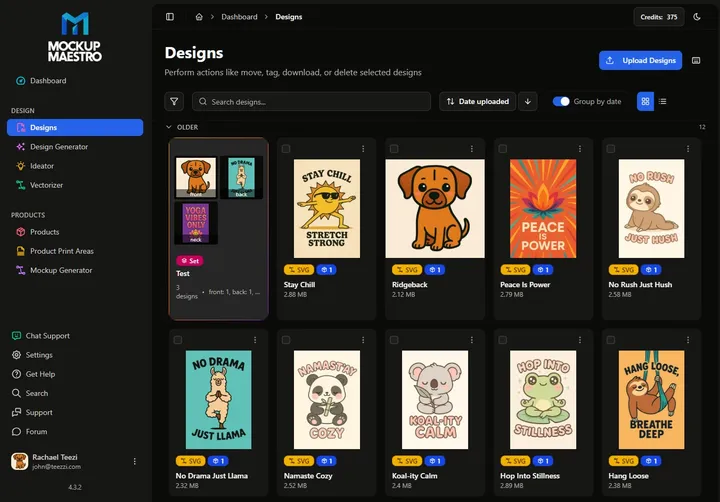
Forget manually renaming print files or losing files in scattered desktop folders. You just drag and drop up to 50 raw design files directly into the platform workspace at once.

Our engine doesn't just store your files—it actively analyzes them. It automatically detects and remembers the exact top 5 colors in your artwork to inform future mapping.

Need advanced placements? Our tool instantly tags complementary designs via "Smart Alternates" (for mapping light art to dark shirts) and optionally groups your artwork into "Sets" (to properly map multi-print areas like chests and backs simultaneously).

🎯 The Pain It Kills: You will never accidentally ruin an order by printing unreadable dark text on a black shirt. By uploading your "Smart Alternates", the system completely automates the light/dark switching logic applied to the correct garment colors.
Old Norm: 5 mins
Maestro: 2 secs
Step 2 Speed: 1 Click

Destroy the Soul-Leeching Repetition

The Tool: Master Templates

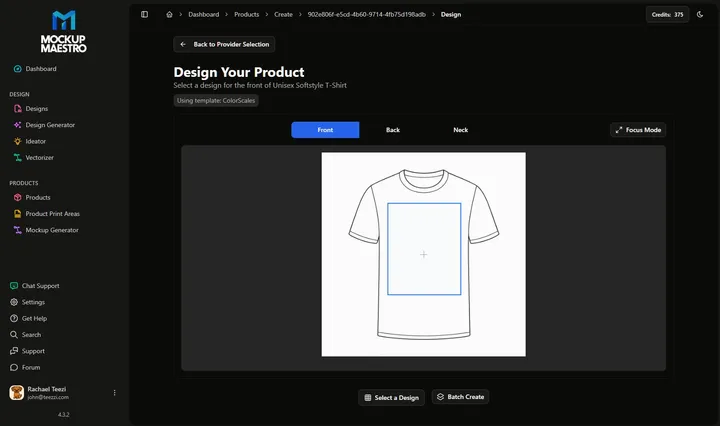
When I was uploading manually, picking the Gildan 64000/Monster Digital setup 50 times in a row was soul-crushing. We fixed that with 1-Click Master Templates.

You choose your product blank, select your fulfiller, pick your color variants, and lock in your profit margins. You save that setup once.

🎯 The Pain It Kills: You completely eliminate the mind-numbing repetition of setting up variants and prices for every new shirt. You apply it to all 50 upcoming listings in a single click.
Old Norm: Hours of clicking
Maestro: 1 click
Step 3 Speed: ~10 Mins

The "Magic Trick" Mockup Sync Literal Cheat Code

The Tool: Shopify Mockup Sync

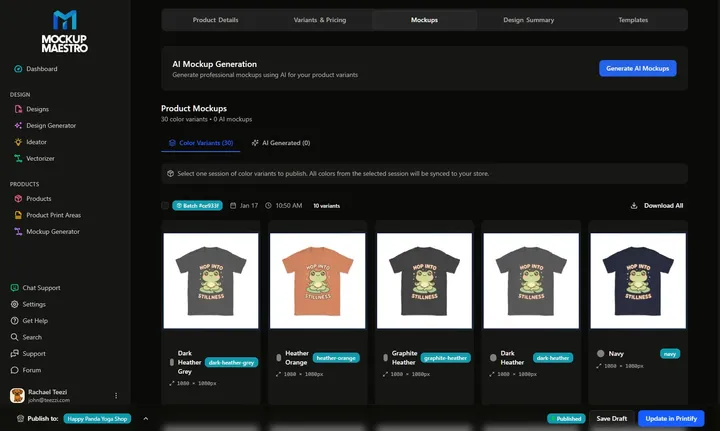
Wave goodbye to massive, hard-drive-crushing ZIP files. While you grab a coffee, the Maestro engine pushes your batch of products straight from Printify into your Shopify store—but that's only half the magic.

Here is the ultimate cheat code and the platform's biggest absolute time-saver: Auto-Variant Assignment.

The system doesn't just casually dump your images into the product gallery. Maestro automatically assigns your specific, custom-color mockup images directly to the corresponding layout color variant. It does this flawlessly for every distinct variant on every single shirt in your batch.

When your buyer clicks "Navy", your Shopify accurately displays the Navy mockup. No manual clicking required.

🎯 The Pain It Kills: You completely eliminate the worst bottleneck in POD: manually opening hundreds of listings, uploading loose tracking images, and brain-numbingly assigning the "black shirt" front image to the "Black" Shopify menu option. It maps perfectly every time without you touching a thing.
Old Norm: Hours of clicking
Maestro: 0 touch

Ready to Autopilot Your POD Workflow?

Words are cheap—especially software promises. Create a free account right now, drop in 10 loose design files, and watch the platform build perfectly-mapped mockups directly in your real store within minutes.

No credit card required.
Full platform access.
Up to 10 active products.