

Comparisons
MyDesigns Pricing: Is It Worth It for Printify + Shopify?
Compare MyDesigns pricing by credits, bulk limits, Shopify publishing, cleanup time, and cost per published product before choosing a POD workflow.
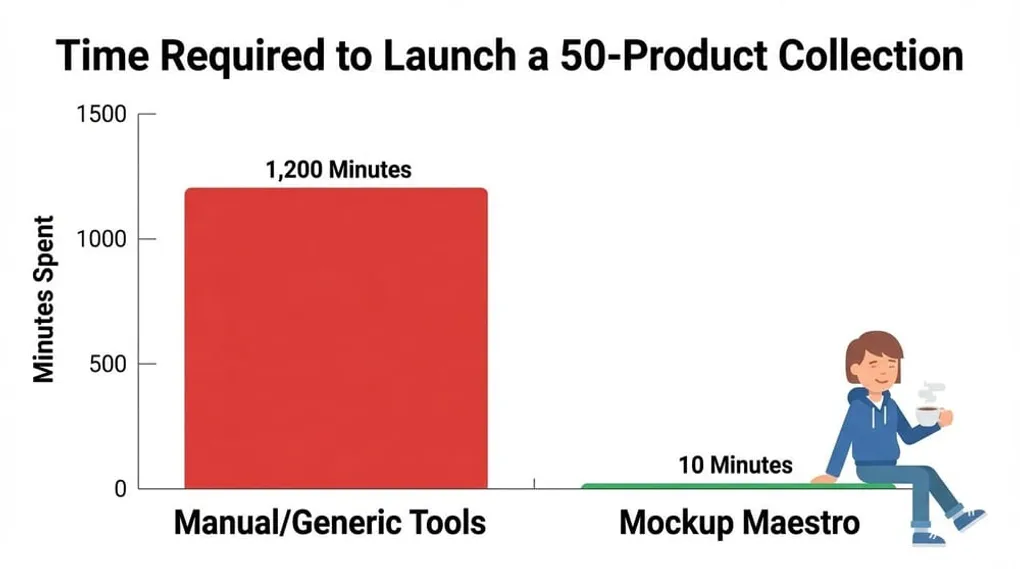
Quick answer: MyDesigns pricing can be worth it when your team uses the broad workspace: POD and digital products, asset storage, bulk processing, AI/design utilities, credits, and marketplace publishing. If your weekly bottleneck is finished designs getting stuck between Printify products, mockups, Shopify listings, retries, and cleanup, compare the plan price against a focused Printify plus Shopify workflow.
As of May 23, 2026, the public MyDesigns pricing page lists Free, Starter, Pro, and Pro Plus tiers. The yearly view shown on the page lists Free at $0/month, Starter at $18.75/month, Pro at $38/month, and Pro Plus at $74.99/month, with plan differences around storage, credits, bulk processing, POD discounts, Shopify stores, Shopify publishing, Etsy publishing, and design/automation tools. Pricing pages can change, and monthly/yearly toggles matter, so verify the active billing view before buying.
The right question is not “Is MyDesigns cheap?” The right question is “Does this plan remove enough weekly work to justify the cost for my actual Printify and Shopify workflow?”
Key takeaways
- MyDesigns pricing should be judged by workflow fit, not the lowest visible monthly number.
- Check credits, bulk processing, storage, Shopify publishing, Etsy publishing, connected store limits, and failed-job recovery.
- A broad workspace is valuable if your team uses the breadth every week.
- A focused Printify plus Shopify workflow is worth testing if your bottleneck is product setup, mockups, publishing status, and cleanup.
- Compare cost per successfully published product before switching tools.
What to check on the MyDesigns pricing page
Open the current MyDesigns pricing page and look past the plan names. The useful comparison points are the operating limits:
- Credits: How many credit-consuming actions your workflow needs each month.
- Bulk processing: How many batch jobs you can run before upgrading.
- Cloud storage: Whether your design library fits the plan.
- Shopify stores: How many storefronts your business needs.
- Shopify publishing: Whether the plan limit matches your launch rhythm.
- POD discounts: Whether the discount applies to the products you actually sell.
- Design and AI tools: Whether you need the broader creative system or only the publishing workflow.
- Recovery path: Whether failed or stuck jobs are clear enough that you can fix them without rebuilding the batch.
If your team runs Etsy, Shopify, digital products, AI design, mockups, and asset management from one workspace, the breadth can be the point. If your team already has designs and mainly needs a cleaner Printify-to-Shopify production path, the extra surface area may not be where you get paid back.
The cost-per-published-product test
Use this formula for any MyDesigns pricing comparison:
(monthly software spend + monthly labor cost + add-ons + failed-job cleanup) / successfully published products
This matters because pricing pages do not show your real workflow cost. A plan can look affordable and still be expensive if every batch leaves you with manual Shopify cleanup, missed images, unclear status, or rework.
Run the same test against Mockup Maestro:
- connect Printify and Shopify
- upload a small batch of real designs
- create products from repeatable choices
- prepare mockups and product media
- publish or prepare the Shopify output
- record failed jobs, retry time, and cleanup time
Then compare the cost of each workflow, not just the subscription.
Workflow-fit comparison
| Pricing question | MyDesigns is stronger when… | Mockup Maestro is stronger when… |
|---|---|---|
| What are you paying for? | You need a broad POD and digital-product workspace with storage, creative tools, mockups, and marketplace features. | You need a narrower path for Printify product setup, mockups/media, Shopify publishing status, and retries. |
| Where does cost hide? | Credits, bulk limits, storage needs, store limits, and whether the broader features are used enough to justify the plan. | Labor spent on manual product setup, image cleanup, variant checks, failed jobs, and repeat Shopify publishing work. |
| How should you test it? | Run a real batch and confirm the plan handles the channels, credits, and publishing actions you need. | Run a five-product Printify plus Shopify batch and measure cleanup after the workflow says it is done. |
| Who should avoid switching? | Sellers already using the broader workspace every week with little cleanup. | Sellers who need a full all-in-one creative, asset-management, and multi-marketplace system. |
When MyDesigns is probably the better fit
Stay with or choose MyDesigns when the breadth is central to the business:
- Your team manages a large creative library across multiple channels.
- You publish to Etsy and Shopify and need both in the same workspace.
- You use the AI, design, utility, and batch-editing features every week.
- Your bottleneck is organizing and transforming many types of assets.
- Your team benefits from an all-in-one workspace more than a narrower production path.
That is a legitimate use case. A focused tool is not automatically better when the business actually needs a broader operating environment.
When Mockup Maestro is probably the better fit
Mockup Maestro is worth comparing when your workflow is more specific:
- Printify is your core fulfillment path.
- Shopify is your primary storefront.
- You already have designs or a repeatable design creation process.
- Product setup, mockups, variant media, publishing status, and retries are the bottleneck.
- You want to reduce the time between finished design and publish-ready product.
In that case, the better tool is the one that makes the weekly production loop easier to repeat. Start with the MyDesigns alternative decision page, the broader MyDesigns vs Mockup Maestro comparison, or the workflow-focused MyDesigns review for Printify and Shopify sellers.
A five-product pricing test
Before changing tools or upgrading plans, run a controlled test:
- Choose five designs you would actually launch.
- Use the same Printify product type and Shopify store.
- Build the products in each workflow.
- Record setup time, mockup/media time, publishing time, failures, and cleanup.
- Calculate cost per successfully published product.
This keeps the decision grounded. If MyDesigns saves more total work, choose MyDesigns. If Mockup Maestro gets the finished designs live with less friction, choose the focused workflow.
Run a five-product Printify + Shopify batch
Use real designs, one Printify product type, and your Shopify workflow. Then compare cleanup time, retries, and cost per successfully published product.
Frequently asked questions
How much does MyDesigns cost?
MyDesigns publishes current plan details on its official pricing page. As of this update, the page lists Free, Starter, Pro, and Pro Plus tiers with different limits for credits, storage, bulk processing, and publishing. Confirm the active monthly or yearly billing price before buying.
Is MyDesigns worth it?
It is worth it if your team uses enough of the broad workspace to save time every week. It is less compelling if your main need is a narrow Printify and Shopify publishing workflow.
What is the best MyDesigns alternative for Shopify sellers?
If Shopify plus Printify is the main workflow, Mockup Maestro is a focused alternative to evaluate. If you need broader marketplace and asset-management coverage, MyDesigns may still fit better.
Should I choose the cheapest plan?
Not automatically. Choose the plan or tool that produces the lowest cost per successfully published product after software, labor, failed jobs, and cleanup are included.
How should a serious POD seller compare tools?
Use real designs, real product types, and your actual Shopify store. Measure how long it takes to get clean products ready, how many manual fixes remain, and how clearly failed jobs can be recovered.
Next steps
Related workflow pages
Turn this guide into a working production path inside Mockup Maestro.
Printify automation software
Automate the product setup steps around Printify while keeping fulfillment safe.
Printify bulk upload
Build reusable product templates and bulk upload Printify-ready products with fewer clicks.
Printify integration
See how Printify fits into a cleaner POD production workflow.
Pricing
Compare plans against the manual labor cost of publishing at scale.
